Leading whitespace (spaces and tabs) at the beginning of a logical line is used to compute the indentation level of the line, which in turn is used to determine the grouping of statements.
First, tabs are replaced (from left to right) by one to eight spaces such that the total number of characters up to and including the replacement is a multiple of eight (this is intended to be the same rule as used by Unix). The total number of spaces preceding the first non-blank character then determines the line’s indentation. Indentation cannot be split over multiple physical lines using backslashes; the whitespace up to the first backslash determines the indentation.
Cross-platform compatibility note: because of the nature of text editors on non-UNIX platforms, it is unwise to use a mixture of spaces and tabs for the indentation in a single source file.
A formfeed character may be present at the start of the line; it will be ignored for the indentation calculations above. Formfeed characters occurring elsewhere in the leading whitespace have an undefined effect (for instance, they may reset the space count to zero).
The indentation levels of consecutive lines are used to generate INDENT and DEDENT tokens, using a stack, as follows.
Before the first line of the file is read, a single zero is pushed on the stack; this will never be popped off again. The numbers pushed on the stack will always be strictly increasing from bottom to top. At the beginning of each logical line, the line’s indentation level is compared to the top of the stack. If it is equal, nothing happens. If it is larger, it is pushed on the stack, and one INDENT token is generated. If it is smaller, it must be one of the numbers occurring on the stack; all numbers on the stack that are larger are popped off, and for each number popped off a DEDENT token is generated. At the end of the file, a DEDENT token is generated for each number remaining on the stack that is larger than zero.
Here is an example of a correctly (though confusingly) indented piece of Python code:
def perm(l): # Compute the list of all permutations of l if len(l) <= 1: return [l] r = [] for i in range(len(l)): s = l[:i] + l[i+1:] p = perm(s) for x in p: r.append(l[i:i+1] + x) return r
The following example shows various indentation errors:
(Actually, the first three errors are detected by the parser; only the last error is found by the lexical analyzer – the indentation of return r does not match a level popped off the stack.)
Applications of Tutorial & Cheat Sheet Respectivley (At Bottom Of Tutorial):
Basics
PEP8 : Python Enhancement Proposals, style-guide for Python.
print is the equivalent of console.log.
‘print() == console.log()’
# is used to make comments in your code.
Python has a built in help function that let’s you see a description of the source code without having to navigate to it… “-SickNasty … Autor Unknown”
Numbers
Python has three types of numbers:
Integer
Positive and Negative Counting Numbers.
No Decimal Point
Created by a literal non-decimal point number … or … with the int() constructor.
3. Complex Numbers
Consist of a real part and imaginary part.
Boolean is a subtype of integer in Python.🤷♂️
If you came from a background in JavaScript and learned to accept the premise(s) of the following meme…
Than I am sure you will find the means to suspend your disbelief.
KEEP IN MIND:
The i is switched to a j in programming.
This is because the letter i is common place as the de facto index for any and all enumerable entities so it just makes sense not to compete for name-space when there’s another 25 letters that don’t get used for every loop under the sun. My most medium apologies to Leonhard Euler.
Type Casting : The process of converting one number to another.
The arithmetic operators are the same between JS and Python, with two additions:
“**” : Double asterisk for exponent.*
“//” : Integer Division.
There are no spaces between math operations in Python.
Integer Division gives the other part of the number from Module; it is a way to do round down numbers replacing Math.floor() in JS.
There are no ++ and `` in Python, the only shorthand operators are:
Strings
Python uses both single and double quotes.
You can escape strings like so 'Jodi asked, "What\\'s up, Sam?"'
Multiline strings use triple quotes.
Use the len() function to get the length of a string.
Python uses zero-based indexing
Python allows negative indexing (thank god!)
Python let’s you use ranges
You can think of this as roughly equivalent to the slice method called on a JavaScript object or string… (mind you that in JS … strings are wrapped in an object (under the hood)… upon which the string methods are actually called. As a immutable privative type by textbook definition, a string literal could not hope to invoke most of it’s methods without violating the state it was bound to on initialization if it were not for this bit of syntactic sugar.)
The end range is exclusive just like slice in JS.
The index string function is the equiv. of indexOf() in JS
The count function finds out how many times a substring appears in a string… pretty nifty for a hard coded feature of the language.
You can use + to concatenate strings, just like in JS.
You can also use “” to repeat strings or multiply strings.**
Use the format() function to use placeholders in a string to input values later on.
Shorthand way to use format function is:print(f'Your name is {first_name} {last_name}')
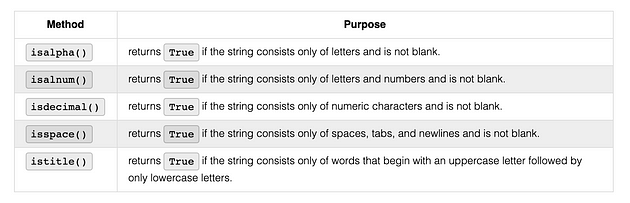
Some useful string methods.
Note that in JS join is used on an Array, in Python it is used on String.
By default, Python considers an object to be true UNLESS it is one of the following:
Constant None or False
Zero of any numeric type.
Empty Sequence or Collection.
True and False must be capitalized
Comparison Operators
Python uses all the same equality operators as JS.
In Python, equality operators are processed from left to right.
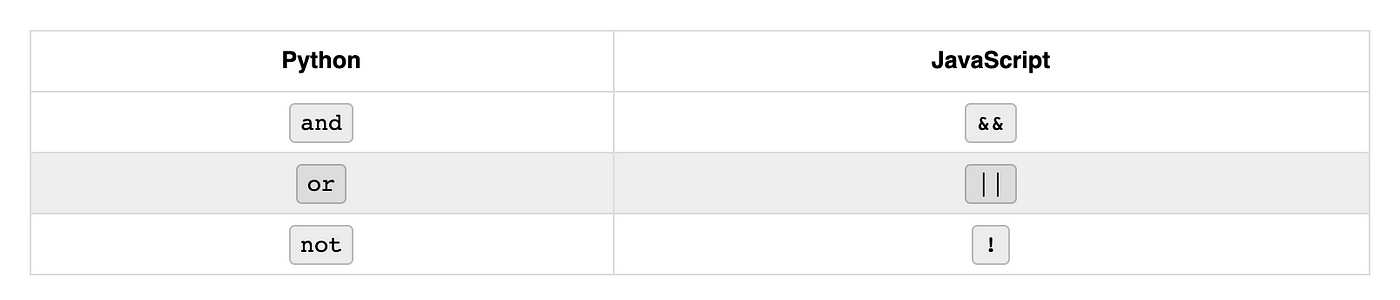
Logical operators are processed in this order:
NOT
AND
OR
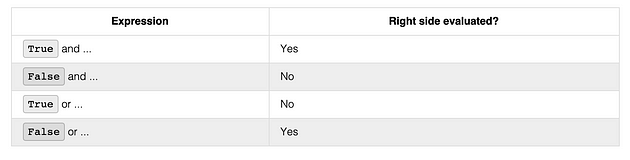
Just like in JS, you can use parentheses to change the inherent order of operations.Short Circuit : Stopping a program when a true or false has been reached.
In the Python community it is better to use is and is not over == or !=
If Statements*
if name == 'Monica': print('Hi, Monica.')if name == 'Monica': print('Hi, Monica.')else: print('Hello, stranger.')if name == 'Monica': print('Hi, Monica.')elif age < 12: print('You are not Monica, kiddo.')elif age > 2000: print('Unlike you, Monica is not an undead, immortal vampire.')elif age > 100: print('You are not Monica, grannie.')Remember the order of elif statements matter.
While Statements
Break statement also exists in Python.
As are continue statements
Try/Except Statements
Python equivalent to try/catch
You can name an error to give the output more specificity.
You can also use the pass commmand to by pass a certain error.
The pass method won’t allow you to bypass every single error so you can chain an exception series like so:
You can use an else statement to end a chain of except statements.
finally is used at the end to clean up all actions under any circumstance.
Using duck typing to check to see if some value is able to use a certain method.
Pass
Pass Keyword is required to write the JS equivalent of :
Functions
Function definition includes:
The def keyword
The name of the function
A list of parameters enclosed in parentheses.
A colon at the end of the line.
One tab indentation for the code to run.
You can use default parameters just like in JS
Keep in mind, default parameters must always come after regular parameters.
You can specify arguments by name without destructuring in Python.
The lambda keyword is used to create anonymous functions and are supposed to be one-liners.
toUpper = lambda s: s.upper()
Notes
Formatted Strings
Remember that in Python join() is called on a string with an array/list passed in as the argument.Python has a very powerful formatting engine.format() is also applied directly to strings.
Comma Thousands Separator
Date and Time
Percentage
Data Tables
**Python can be used to display html, css, and JS.**It is common to use Python as an API (Application Programming Interface)
Structured Data
Sequence : The most basic data structure in Python where the index determines the order.
ListTupleRangeCollections : Unordered data structures, hashable values.
DictionariesSetsIterable : Generic name for a sequence or collection; any object that can be iterated through.Can be mutable or immutable.Built In Data Types
Lists are the python equivalent of arrays.
You can instantiate
Test if a value is in a list.
Instantiated with parentheses
Sometimes instantiated without
Tuple() built in can be used to convert other data into a tuple
Ranges : A list of numbers which can’t be changed; often used with for loops.
Declared using one to three parameters.
Start : opt. default 0, first # in sequence.Stop : required next number past the last number in the sequence.Step : opt. default 1, difference between each number in the sequence.
Dictionaries : Mappable collection where a hashable value is used as a key to ref. an object stored in the dictionary.
Mutable.
Declared with curly braces of the built in dict()
Benefit of dictionaries in Python is that it doesn’t matter how it is defined, if the keys and values are the same the dictionaries are considered equal.
Use the in operator to see if a key exists in a dictionary.
Sets : Unordered collection of distinct objects; objects that need to be hashable.
Always be unique, duplicate items are auto dropped from the set.
zip(*iterables) : creates a zip object filled with tuples that combine 1 to 1 the items in each provided iterable.Functions that analyze iterable
len(iterable) : returns the count of the number of items.
max(args, key=None) : returns the largest of two or more arguments.
max(iterable, key=None) : returns the largest item in the iterable.
key optional function which converts an item to a value to be compared.min works the same way as max
sum(iterable) : used with a list of numbers to generate the total.
There is a faster way to concatenate an array of strings into one string, so do not use sum for that.
any(iterable) : returns True if any items in the iterable are true.
all(iterable) : returns True is all items in the iterable are true.
Working with dictionaries
dir(dictionary) : returns the list of keys in the dictionary.Working with sets
Union : The pipe | operator or union(sets) function can be used to produce a new set which is a combination of all elements in the provided set.
Intersection : The & operator ca be used to produce a new set of only the elements that appear in all sets.
Symmetric Difference : The ^ operator can be used to produce a new set of only the elements that appear in exactly one set and not in both.
For StatementsIn python, there is only one for loop.
Always Includes:
The for keyword2. A variable name3. The ‘in’ keyword4. An iterable of some kid5. A colon6. On the next line, an indented block of code called the for clause.
You can use break and continue statements inside for loops as well.
You can use the range function as the iterable for the for loop.
Common technique is to use the len() on a pre-defined list with a for loop to iterate over the indices of the list.
You can loop and destructure at the same time.
Prints 1, 2Prints 3, 4Prints 5, 6
You can use values() and keys() to loop over dictionaries.
Prints red
Prints 42
Prints color
Prints age
For loops can also iterate over both keys and values.
Getting tuples
Prints (‘color’, ‘red’)
Prints (‘age’, 42)
Destructuring to values
Prints Key: age Value: 42
Prints Key: color Value: red
Looping over string
When you order arguments within a function or function call, the args need to occur in a particular order:
formal positional args.
args
keyword args with default values
kwargs
Importing in Python
Modules are similar to packages in Node.jsCome in different types:
Built-In,
Third-Party,
Custom.
All loaded using import statements.
Terms
module : Python code in a separate file.package : Path to a directory that contains modules.init.py : Default file for a package.submodule : Another file in a module’s folder.function : Function in a module.
A module can be any file but it is usually created by placing a special fileinit.pyinto a folder. pic
Try to avoid importing with wildcards in Python.
Use multiple lines for clarity when importing.
Watching Out for Python 2
Python 3 removed <> and only uses !=
format() was introduced with P3
All strings in P3 are unicode and encoded.md5 was removed.
ConfigParser was renamed to configparsersets were killed in favor of set() class.
print was a statement in P2, but is a function in P3.
Leading whitespace (spaces and tabs) at the beginning of a logical line is used to compute the indentation level of the line, which in turn is used to determine the grouping of statements.
First, tabs are replaced (from left to right) by one to eight spaces such that the total number of characters up to and including the replacement is a multiple of eight (this is intended to be the same rule as used by Unix). The total number of spaces preceding the first non-blank character then determines the line’s indentation. Indentation cannot be split over multiple physical lines using backslashes; the whitespace up to the first backslash determines the indentation.
Cross-platform compatibility note: because of the nature of text editors on non-UNIX platforms, it is unwise to use a mixture of spaces and tabs for the indentation in a single source file.
A formfeed character may be present at the start of the line; it will be ignored for the indentation calculations above. Formfeed characters occurring elsewhere in the leading whitespace have an undefined effect (for instance, they may reset the space count to zero).
The indentation levels of consecutive lines are used to generate INDENT and DEDENT tokens, using a stack, as follows.
Before the first line of the file is read, a single zero is pushed on the stack; this will never be popped off again. The numbers pushed on the stack will always be strictly increasing from bottom to top. At the beginning of each logical line, the line’s indentation level is compared to the top of the stack. If it is equal, nothing happens. If it is larger, it is pushed on the stack, and one INDENT token is generated. If it is smaller, it must be one of the numbers occurring on the stack; all numbers on the stack that are larger are popped off, and for each number popped off a DEDENT token is generated. At the end of the file, a DEDENT token is generated for each number remaining on the stack that is larger than zero.
Here is an example of a correctly (though confusingly) indented piece of Python code:
def perm(l): # Compute the list of all permutations of l if len(l) <= 1: return [l] r = [] for i in range(len(l)): s = l[:i] + l[i+1:] p = perm(s) for x in p: r.append(l[i:i+1] + x) return r
The following example shows various indentation errors:
(Actually, the first three errors are detected by the parser; only the last error is found by the lexical analyzer – the indentation of return r does not match a level popped off the stack.)
Applications of Tutorial & Cheat Sheet Respectivley (At Bottom Of Tutorial):
Basics
PEP8 : Python Enhancement Proposals, style-guide for Python.
print is the equivalent of console.log.
‘print() == console.log()’
# is used to make comments in your code.
Python has a built in help function that let’s you see a description of the source code without having to navigate to it… “-SickNasty … Autor Unknown”
Numbers
Python has three types of numbers:
Integer
Positive and Negative Counting Numbers.
No Decimal Point
Created by a literal non-decimal point number … or … with the int() constructor.
3. Complex Numbers
Consist of a real part and imaginary part.
Boolean is a subtype of integer in Python.🤷♂️
If you came from a background in JavaScript and learned to accept the premise(s) of the following meme…
Than I am sure you will find the means to suspend your disbelief.
KEEP IN MIND:
The i is switched to a j in programming.
This is because the letter i is common place as the de facto index for any and all enumerable entities so it just makes sense not to compete for name-space when there’s another 25 letters that don’t get used for every loop under the sun. My most medium apologies to Leonhard Euler.
Type Casting : The process of converting one number to another.
The arithmetic operators are the same between JS and Python, with two additions:
“**” : Double asterisk for exponent.*
“//” : Integer Division.
There are no spaces between math operations in Python.
Integer Division gives the other part of the number from Module; it is a way to do round down numbers replacing Math.floor() in JS.
There are no ++ and `` in Python, the only shorthand operators are:
Strings
Python uses both single and double quotes.
You can escape strings like so 'Jodi asked, "What\\'s up, Sam?"'
Multiline strings use triple quotes.
Use the len() function to get the length of a string.
Python uses zero-based indexing
Python allows negative indexing (thank god!)
Python let’s you use ranges
You can think of this as roughly equivalent to the slice method called on a JavaScript object or string… (mind you that in JS … strings are wrapped in an object (under the hood)… upon which the string methods are actually called. As a immutable privative type by textbook definition, a string literal could not hope to invoke most of it’s methods without violating the state it was bound to on initialization if it were not for this bit of syntactic sugar.)
The end range is exclusive just like slice in JS.
The index string function is the equiv. of indexOf() in JS
The count function finds out how many times a substring appears in a string… pretty nifty for a hard coded feature of the language.
You can use + to concatenate strings, just like in JS.
You can also use “” to repeat strings or multiply strings.**
Use the format() function to use placeholders in a string to input values later on.
Shorthand way to use format function is:print(f'Your name is {first_name} {last_name}')
Some useful string methods.
Note that in JS join is used on an Array, in Python it is used on String.
By default, Python considers an object to be true UNLESS it is one of the following:
Constant None or False
Zero of any numeric type.
Empty Sequence or Collection.
True and False must be capitalized
Comparison Operators
Python uses all the same equality operators as JS.
In Python, equality operators are processed from left to right.
Logical operators are processed in this order:
NOT
AND
OR
Just like in JS, you can use parentheses to change the inherent order of operations.Short Circuit : Stopping a program when a true or false has been reached.
In the Python community it is better to use is and is not over == or !=
If Statements*
if name == 'Monica': print('Hi, Monica.')if name == 'Monica': print('Hi, Monica.')else: print('Hello, stranger.')if name == 'Monica': print('Hi, Monica.')elif age < 12: print('You are not Monica, kiddo.')elif age > 2000: print('Unlike you, Monica is not an undead, immortal vampire.')elif age > 100: print('You are not Monica, grannie.')Remember the order of elif statements matter.
While Statements
Break statement also exists in Python.
As are continue statements
Try/Except Statements
Python equivalent to try/catch
You can name an error to give the output more specificity.
You can also use the pass commmand to by pass a certain error.
The pass method won’t allow you to bypass every single error so you can chain an exception series like so:
You can use an else statement to end a chain of except statements.
finally is used at the end to clean up all actions under any circumstance.
Using duck typing to check to see if some value is able to use a certain method.
Pass
Pass Keyword is required to write the JS equivalent of :
Functions
Function definition includes:
The def keyword
The name of the function
A list of parameters enclosed in parentheses.
A colon at the end of the line.
One tab indentation for the code to run.
You can use default parameters just like in JS
Keep in mind, default parameters must always come after regular parameters.
You can specify arguments by name without destructuring in Python.
The lambda keyword is used to create anonymous functions and are supposed to be one-liners.
toUpper = lambda s: s.upper()
Notes
Formatted Strings
Remember that in Python join() is called on a string with an array/list passed in as the argument.Python has a very powerful formatting engine.format() is also applied directly to strings.
Comma Thousands Separator
Date and Time
Percentage
Data Tables
**Python can be used to display html, css, and JS.**It is common to use Python as an API (Application Programming Interface)
Structured Data
Sequence : The most basic data structure in Python where the index determines the order.
ListTupleRangeCollections : Unordered data structures, hashable values.
DictionariesSetsIterable : Generic name for a sequence or collection; any object that can be iterated through.Can be mutable or immutable.Built In Data Types
Lists are the python equivalent of arrays.
You can instantiate
Test if a value is in a list.
Instantiated with parentheses
Sometimes instantiated without
Tuple() built in can be used to convert other data into a tuple
Ranges : A list of numbers which can’t be changed; often used with for loops.
Declared using one to three parameters.
Start : opt. default 0, first # in sequence.Stop : required next number past the last number in the sequence.Step : opt. default 1, difference between each number in the sequence.
Dictionaries : Mappable collection where a hashable value is used as a key to ref. an object stored in the dictionary.
Mutable.
Declared with curly braces of the built in dict()
Benefit of dictionaries in Python is that it doesn’t matter how it is defined, if the keys and values are the same the dictionaries are considered equal.
Use the in operator to see if a key exists in a dictionary.
Sets : Unordered collection of distinct objects; objects that need to be hashable.
Always be unique, duplicate items are auto dropped from the set.
zip(*iterables) : creates a zip object filled with tuples that combine 1 to 1 the items in each provided iterable.Functions that analyze iterable
len(iterable) : returns the count of the number of items.
max(args, key=None) : returns the largest of two or more arguments.
max(iterable, key=None) : returns the largest item in the iterable.
key optional function which converts an item to a value to be compared.min works the same way as max
sum(iterable) : used with a list of numbers to generate the total.
There is a faster way to concatenate an array of strings into one string, so do not use sum for that.
any(iterable) : returns True if any items in the iterable are true.
all(iterable) : returns True is all items in the iterable are true.
Working with dictionaries
dir(dictionary) : returns the list of keys in the dictionary.Working with sets
Union : The pipe | operator or union(sets) function can be used to produce a new set which is a combination of all elements in the provided set.
Intersection : The & operator ca be used to produce a new set of only the elements that appear in all sets.
Symmetric Difference : The ^ operator can be used to produce a new set of only the elements that appear in exactly one set and not in both.
For StatementsIn python, there is only one for loop.
Always Includes:
The for keyword2. A variable name3. The ‘in’ keyword4. An iterable of some kid5. A colon6. On the next line, an indented block of code called the for clause.
You can use break and continue statements inside for loops as well.
You can use the range function as the iterable for the for loop.
Common technique is to use the len() on a pre-defined list with a for loop to iterate over the indices of the list.
You can loop and destructure at the same time.
Prints 1, 2Prints 3, 4Prints 5, 6
You can use values() and keys() to loop over dictionaries.
Prints red
Prints 42
Prints color
Prints age
For loops can also iterate over both keys and values.
Getting tuples
Prints (‘color’, ‘red’)
Prints (‘age’, 42)
Destructuring to values
Prints Key: age Value: 42
Prints Key: color Value: red
Looping over string
When you order arguments within a function or function call, the args need to occur in a particular order:
formal positional args.
args
keyword args with default values
kwargs
Importing in Python
Modules are similar to packages in Node.jsCome in different types:
Built-In,
Third-Party,
Custom.
All loaded using import statements.
Terms
module : Python code in a separate file.package : Path to a directory that contains modules.init.py : Default file for a package.submodule : Another file in a module’s folder.function : Function in a module.
A module can be any file but it is usually created by placing a special fileinit.pyinto a folder. pic
Try to avoid importing with wildcards in Python.
Use multiple lines for clarity when importing.
Watching Out for Python 2
Python 3 removed <> and only uses !=
format() was introduced with P3
All strings in P3 are unicode and encoded.md5 was removed.
ConfigParser was renamed to configparsersets were killed in favor of set() class.
print was a statement in P2, but is a function in P3.
 `def perm(l):                       # error: first line indented
for i in range(len(l)):             # error: not indented
    s = l[:i] + l[i+1:]
        p = perm(l[:i] + l[i+1:])   # error: unexpected indent
        for x in p:
                r.append(l[i:i+1] + x)
            return r                # error: inconsistent dedent`
def foo():
    """
    The foo function does many amazing things that you
    should not question. Just accept that it exists and
    use it with caution.
    """
    secretThing()
# Using Float
print(17)               # => 17
print(float(17))        # => 17.0# Using Int
print(17.0)             # => 17.0
print(int(17.0))        # => 17# Using Str
print(str(17.0) + ' and ' + str(17))        # => 17.0 and 17
print('''My instructions are very long so to make them
more readable in the code I am putting them on
more than one line. I can even include "quotes"
of any kind because they won't get confused with
the end of the string!''')
print(len(“Spaghetti”)) # => 9
print(“Spaghetti”[-1]) # => i print(“Spaghetti”[-4]) # => e
# Shortcut to get from the beginning of a string to a certain index.
print("Spaghetti"[:4])  # => Spag
print("Spaghetti"[:-1])    # => Spaghett# Shortcut to get from a certain index to the end of a string.
print("Spaghetti"[1:])  # => paghetti
print("Spaghetti"[-4:])    # => etti
print("Spaghetti".count("h"))    # => 1
print("Spaghetti".count("t"))    # => 2
print("Spaghetti".count("s"))    # => 0
print('''We choose to go to the moon in this decade and do the other things,
not because they are easy, but because they are hard, because that goal will
serve to organize and measure the best of our energies and skills, because that
challenge is one that we are willing to accept, one we are unwilling to
postpone, and one which we intend to win, and the others, too.
'''.count('the '))                # => 4
first_name = "Billy"
last_name = "Bob"
print('Your name is {0} {1}'.format(first_name, last_name))  # => Your name is Billy Bob
a = 7
b = 'Marbles'
print(a)         # => 7
print(b)         # => Marbles
count = max = min = 0
print(count)           # => 0
print(max)             # => 0
print(min)             # => 0
a = 17
print(a)         # => 17
a = 'seventeen'
print(a)         # => seventeen
# Logical AND
print(True and True)    # => True
print(True and False)   # => False
print(False and False)  # => False# Logical OR
print(True or True)     # => True
print(True or False)    # => True
print(False or False)   # => False# Logical NOT
print(not True)             # => False
print(not False and True)   # => True
print(not True or False)    # => False
print (2 == '2')    # => False
print (2 is '2')    # => Falseprint ("2" == '2')    # => True
print ("2" is '2')    # => True# There is a distinction between the number types.
print (2 == 2.0)    # => True
print (2 is 2.0)    # => False
spam = 0
while True:
  print('Hello, world.')
  spam = spam + 1
  if spam >= 5:
    break
spam = 0
while True:
  print('Hello, world.')
  spam = spam + 1
  if spam < 5:
    continue
  break
a = 321
try:
    print(len(a))
except:
    print('Silently handle error here')    # Optionally include a correction to the issue
    a = str(a)
    print(len(a)a = '321'
try:
    print(len(a))
except:
    print('Silently handle error here')    # Optionally include a correction to the issue
    a = str(a)
    print(len(a))
a = 100
b = 0
try:
    c = a / b
except ZeroDivisionError:
    c = None
print(c)
a = 100
b = 0
try:
    print(a / b)
except ZeroDivisionError:
    pass
a = 100
# b = "5"
try:
    print(a / b)
except ZeroDivisionError:
    pass
except (TypeError, NameError):
    print("ERROR!")
# tuple of file names
files = ('one.txt', 'two.txt', 'three.txt')# simple loop
for filename in files:
    try:
        # open the file in read mode
        f = open(filename, 'r')
    except OSError:
        # handle the case where file does not exist or permission is denied
        print('cannot open file', filename)
    else:
        # do stuff with the file object (f)
        print(filename, 'opened successfully')
        print('found', len(f.readlines()), 'lines')
        f.close()
def divide(x, y):
    try:
        result = x / y
    except ZeroDivisionError:
        print("Cannot divide by zero")
    else:
        print("Result is", result)
    finally:
        print("Finally...")
# Try a number - nothing will print out
a = 321
if hasattr(a, '__len__'):
    print(len(a))# Try a string - the length will print out (4 in this case)
b = "5555"
if hasattr(b, '__len__'):
    print(len(b))
if (true) {
}while (true) {}if True:
  passwhile True:
  pass
# THIS IS BAD CODE AND WILL NOT RUN
def increment(delta=1, value):
    return delta + value
def greeting(name, saying="Hello"):
    print(saying, name)# name has no default value, so just provide the value
# saying has a default value, so use a keyword argument
greeting("Monica", saying="Hi")
width=8
print(‘ decimal hex binary’)
print(‘-’*27)
for num in range(1,16):
for base in ‘dXb’:
print(‘{0:{width}{base}}’.format(num, base=base, width=width), end=’ ‘)
print()
Getting Input from the Command Line
Python runs synchronously, all programs and processes will stop when listening for a user input.
The input function shows a prompt to a user and waits for them to type ‘ENTER’.
Scripts vs Programs
Programming Script : A set of code that runs in a linear fashion.
The largest difference between scripts and programs is the level of complexity and purpose. Programs typically have many UI’s.
print(1 in [1, 2, 3]) #> True
print(4 in [1, 2, 3]) #> False
# Tuples : Very similar to lists, but they are immutable
time_blocks = (‘AM’,’PM’)
colors = ‘red’,’blue’,’green’
numbers = 1, 2, 3
tuple(‘abc’) # returns (‘a’, ‘b’, ‘c’)
tuple([1,2,3]) # returns (1, 2, 3)
# Think of tuples as constant variables.
range(5) # [0, 1, 2, 3, 4]
range(1,5) # [1, 2, 3, 4]
range(0, 25, 5) # [0, 5, 10, 15, 20]
range(0) # [ ]
for let (i = 0; i < 5; i++)
for let (i = 1; i < 5; i++)
for let (i = 0; i < 25; i+=5)
for let(i = 0; i = 0; i++)
# Keep in mind that stop is not included in the range.
a = {‘one’:1, ‘two’:2, ‘three’:3}
b = dict(one=1, two=2, three=3)
c = dict([(‘two’, 2), (‘one’, 1), (‘three’, 3)])
# a, b, and c are all equal
a = {1, 2, 3}
b = {2, 4, 6}
print(a | b) # => {1, 2, 3, 4, 6}
a = {1, 2, 3}
b = {2, 4, 6}
print(a & b) # => {2}
Difference : The — operator can be used to produce a new set of only the elements that appear in the first set and NOT the others.
a = {1, 2, 3}
b = {2, 4, 6}
print(a — b) # => {1, 3}
print(b — a) # => {4, 6}
print(a ^ b) # => {1, 3, 4, 6}
print(‘My name is’)
for i in range(5):
print(‘Carlita Cinco (‘ + str(i) + ‘)’)total = 0
for num in range(101):
total += num
print(total)
Looping over a list in Python
for c in [‘a’, ‘b’, ‘c’]:
print(c)lst = [0, 1, 2, 3]
for i in lst:
print(i)
supplies = [‘pens’, ‘staplers’, ‘flame-throwers’, ‘binders’]
for i in range(len(supplies)):
print(‘Index ‘ + str(i) + ‘ in supplies is: ‘ + supplies[i])
l = 1, 2], [3, 4], [5, 6
for a, b in l:
print(a, ‘, ‘, b)
spam = {‘color’: ‘red’, ‘age’: 42}
for v in spam.values():
print(v)
for k in spam.keys():
print(k)
for i in spam.items():
print(i)
for k, v in spam.items():
print(‘Key: ‘ + k + ‘ Value: ‘ + str(v))
from urllib.request import (
HTTPDefaultErrorHandler as ErrorHandler,
HTTPRedirectHandler as RedirectHandler,
Request,
pathname2url,
url2pathname,
urlopen,
)
***and del for is raiseassert elif from lambda returnbreak else global not tryclass except if or whilecontinue exec import passdef finally in print***
 `def perm(l):                       # error: first line indented
for i in range(len(l)):             # error: not indented
    s = l[:i] + l[i+1:]
        p = perm(l[:i] + l[i+1:])   # error: unexpected indent
        for x in p:
                r.append(l[i:i+1] + x)
            return r                # error: inconsistent dedent`
def foo():
    """
    The foo function does many amazing things that you
    should not question. Just accept that it exists and
    use it with caution.
    """
    secretThing()
# Using Float
print(17)               # => 17
print(float(17))        # => 17.0# Using Int
print(17.0)             # => 17.0
print(int(17.0))        # => 17# Using Str
print(str(17.0) + ' and ' + str(17))        # => 17.0 and 17
print('''My instructions are very long so to make them
more readable in the code I am putting them on
more than one line. I can even include "quotes"
of any kind because they won't get confused with
the end of the string!''')
print(len(“Spaghetti”)) # => 9
print(“Spaghetti”[-1]) # => i print(“Spaghetti”[-4]) # => e
# Shortcut to get from the beginning of a string to a certain index.
print("Spaghetti"[:4])  # => Spag
print("Spaghetti"[:-1])    # => Spaghett# Shortcut to get from a certain index to the end of a string.
print("Spaghetti"[1:])  # => paghetti
print("Spaghetti"[-4:])    # => etti
print("Spaghetti".count("h"))    # => 1
print("Spaghetti".count("t"))    # => 2
print("Spaghetti".count("s"))    # => 0
print('''We choose to go to the moon in this decade and do the other things,
not because they are easy, but because they are hard, because that goal will
serve to organize and measure the best of our energies and skills, because that
challenge is one that we are willing to accept, one we are unwilling to
postpone, and one which we intend to win, and the others, too.
'''.count('the '))                # => 4
first_name = "Billy"
last_name = "Bob"
print('Your name is {0} {1}'.format(first_name, last_name))  # => Your name is Billy Bob
a = 7
b = 'Marbles'
print(a)         # => 7
print(b)         # => Marbles
count = max = min = 0
print(count)           # => 0
print(max)             # => 0
print(min)             # => 0
a = 17
print(a)         # => 17
a = 'seventeen'
print(a)         # => seventeen
# Logical AND
print(True and True)    # => True
print(True and False)   # => False
print(False and False)  # => False# Logical OR
print(True or True)     # => True
print(True or False)    # => True
print(False or False)   # => False# Logical NOT
print(not True)             # => False
print(not False and True)   # => True
print(not True or False)    # => False
print (2 == '2')    # => False
print (2 is '2')    # => Falseprint ("2" == '2')    # => True
print ("2" is '2')    # => True# There is a distinction between the number types.
print (2 == 2.0)    # => True
print (2 is 2.0)    # => False
spam = 0
while True:
  print('Hello, world.')
  spam = spam + 1
  if spam >= 5:
    break
spam = 0
while True:
  print('Hello, world.')
  spam = spam + 1
  if spam < 5:
    continue
  break
a = 321
try:
    print(len(a))
except:
    print('Silently handle error here')    # Optionally include a correction to the issue
    a = str(a)
    print(len(a)a = '321'
try:
    print(len(a))
except:
    print('Silently handle error here')    # Optionally include a correction to the issue
    a = str(a)
    print(len(a))
a = 100
b = 0
try:
    c = a / b
except ZeroDivisionError:
    c = None
print(c)
a = 100
b = 0
try:
    print(a / b)
except ZeroDivisionError:
    pass
a = 100
# b = "5"
try:
    print(a / b)
except ZeroDivisionError:
    pass
except (TypeError, NameError):
    print("ERROR!")
# tuple of file names
files = ('one.txt', 'two.txt', 'three.txt')# simple loop
for filename in files:
    try:
        # open the file in read mode
        f = open(filename, 'r')
    except OSError:
        # handle the case where file does not exist or permission is denied
        print('cannot open file', filename)
    else:
        # do stuff with the file object (f)
        print(filename, 'opened successfully')
        print('found', len(f.readlines()), 'lines')
        f.close()
def divide(x, y):
    try:
        result = x / y
    except ZeroDivisionError:
        print("Cannot divide by zero")
    else:
        print("Result is", result)
    finally:
        print("Finally...")
# Try a number - nothing will print out
a = 321
if hasattr(a, '__len__'):
    print(len(a))# Try a string - the length will print out (4 in this case)
b = "5555"
if hasattr(b, '__len__'):
    print(len(b))
if (true) {
}while (true) {}if True:
  passwhile True:
  pass
# THIS IS BAD CODE AND WILL NOT RUN
def increment(delta=1, value):
    return delta + value
def greeting(name, saying="Hello"):
    print(saying, name)# name has no default value, so just provide the value
# saying has a default value, so use a keyword argument
greeting("Monica", saying="Hi")
width=8
print(‘ decimal hex binary’)
print(‘-’*27)
for num in range(1,16):
for base in ‘dXb’:
print(‘{0:{width}{base}}’.format(num, base=base, width=width), end=’ ‘)
print()
Getting Input from the Command Line
Python runs synchronously, all programs and processes will stop when listening for a user input.
The input function shows a prompt to a user and waits for them to type ‘ENTER’.
Scripts vs Programs
Programming Script : A set of code that runs in a linear fashion.
The largest difference between scripts and programs is the level of complexity and purpose. Programs typically have many UI’s.
print(1 in [1, 2, 3]) #> True
print(4 in [1, 2, 3]) #> False
# Tuples : Very similar to lists, but they are immutable
time_blocks = (‘AM’,’PM’)
colors = ‘red’,’blue’,’green’
numbers = 1, 2, 3
tuple(‘abc’) # returns (‘a’, ‘b’, ‘c’)
tuple([1,2,3]) # returns (1, 2, 3)
# Think of tuples as constant variables.
range(5) # [0, 1, 2, 3, 4]
range(1,5) # [1, 2, 3, 4]
range(0, 25, 5) # [0, 5, 10, 15, 20]
range(0) # [ ]
for let (i = 0; i < 5; i++)
for let (i = 1; i < 5; i++)
for let (i = 0; i < 25; i+=5)
for let(i = 0; i = 0; i++)
# Keep in mind that stop is not included in the range.
a = {‘one’:1, ‘two’:2, ‘three’:3}
b = dict(one=1, two=2, three=3)
c = dict([(‘two’, 2), (‘one’, 1), (‘three’, 3)])
# a, b, and c are all equal
a = {1, 2, 3}
b = {2, 4, 6}
print(a | b) # => {1, 2, 3, 4, 6}
a = {1, 2, 3}
b = {2, 4, 6}
print(a & b) # => {2}
Difference : The — operator can be used to produce a new set of only the elements that appear in the first set and NOT the others.
a = {1, 2, 3}
b = {2, 4, 6}
print(a — b) # => {1, 3}
print(b — a) # => {4, 6}
print(a ^ b) # => {1, 3, 4, 6}
print(‘My name is’)
for i in range(5):
print(‘Carlita Cinco (‘ + str(i) + ‘)’)total = 0
for num in range(101):
total += num
print(total)
Looping over a list in Python
for c in [‘a’, ‘b’, ‘c’]:
print(c)lst = [0, 1, 2, 3]
for i in lst:
print(i)
supplies = [‘pens’, ‘staplers’, ‘flame-throwers’, ‘binders’]
for i in range(len(supplies)):
print(‘Index ‘ + str(i) + ‘ in supplies is: ‘ + supplies[i])
l = 1, 2], [3, 4], [5, 6
for a, b in l:
print(a, ‘, ‘, b)
spam = {‘color’: ‘red’, ‘age’: 42}
for v in spam.values():
print(v)
for k in spam.keys():
print(k)
for i in spam.items():
print(i)
for k, v in spam.items():
print(‘Key: ‘ + k + ‘ Value: ‘ + str(v))
from urllib.request import (
HTTPDefaultErrorHandler as ErrorHandler,
HTTPRedirectHandler as RedirectHandler,
Request,
pathname2url,
url2pathname,
urlopen,
)