> For the complete documentation index, see [llms.txt](https://bryan-guner.gitbook.io/my-docs/llms.txt). Markdown versions of documentation pages are available by appending `.md` to page URLs; this page is available as [Markdown](https://bryan-guner.gitbook.io/my-docs/array-methods-lesson/background/mutability.md).
# Mutability
## Mutability And Reference VS Privative Types in JavaScript
Mutability && Primitive && Reference Examples
***
#### Mutability And Reference VS Privative Types in JavaScript
#### Mutability && Primitive && Reference Examples
[***Mutability***](https://doesitmutate.xyz)
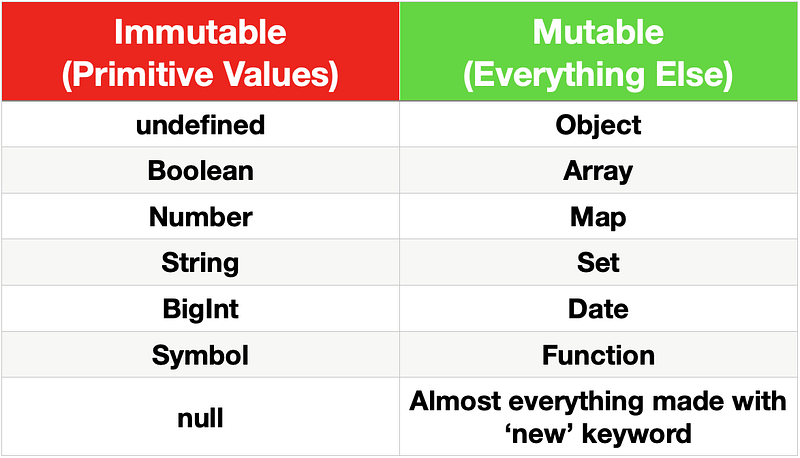
In JavaScript, `String` values are immutable, which means that they cannot be altered once created.
For example, the following code:
```
let myStr = "Bob";
myStr[0] = "J";
```
cannot change the value of `myStr` to `Job`, because the contents of `myStr` cannot be altered. Note that this does *not* mean that `myStr` cannot be changed, just that the individual characters of a string literal cannot be changed. The only way to change `myStr` would be to assign it with a new string, like this:
```
let myStr = "Bob";
myStr = "Job";
```
#### Objects are passed by reference, are mutable, and can be modified by our functions:
```
function rotateLeft(arr, num) {
for (let i = 0; i < num; i++) {
let el = arr.pop();
arr.unshift(el);
}
}
let myArr = [1, 2, 3, 4, 5, ];
rotateLeft(myArr, 2);
console.log(myArr);
```
Strings are passed by value, are immutable, and a new array is constructed and returned, because it cannot be changed in place.
```
function rotateString(str, num) {
return str.slice(num) + str.slice(0, num);
}
let str = "foobar";
let ret = rotateString(str, 3);
console.log(str);
console.log(ret);
```
#### Dereferencing
**Arrays**
To dereference an array, use `let [var1, var2]` syntax.
```
let arr = ['one', 'two', 'three'];
let [first] = arr;
console.log(first);
```
**Objects**
To dereference attributes from an object, use `let {}` syntax.
#### Primitive Data Types in Depth
### What is a Reference?
References are everywhere in JS, but they’re invisible. They just look like variables. Some languages, like C, call these things out explicitly as **pointers**, with their own syntax to boot. But JS doesn’t have pointers, at least not by that name. And JS doesn’t have any special syntax for them, either.
Take this line of JavaScript for example: it creates a variable called `word` that stores the string “hello”.
```
let word = "hello"
```
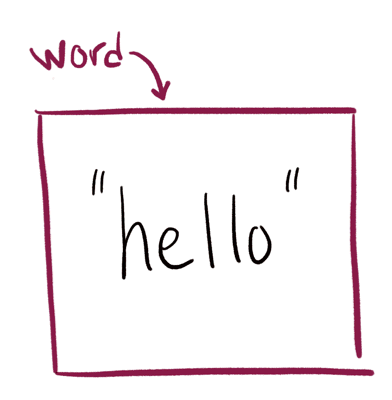
Notice how `word` *points to* the box with the “hello”. There’s a level of indirection here. The variable *is not* the box. The variable points to the box. Let that sink in while you continue reading.
Now let’s give this variable a new value using the assignment operator `=`:
```
word = "world"
```
What’s actually happening here isn’t that the “hello” is being replaced by “world” – it’s more like an entirely new box is created, and the `word` is reassigned to point at the new box. (and at some point, the “hello” box is cleaned up by the garbage collector, since nothing is using it)
If you’ve ever tried to assign a value to a function parameter, you probably realized this doesn’t change anything outside the function.
The reason this happens is because reassigning a function parameter will only affect the local variable, not the original one that was passed in. Here’s an example:
```
function reassignFail(word) {
// this assignment does not leak out
word = "world"
}
let test = "hello"
reassignFail(test)
console.log(test) // prints "hello"
```
Initially, only `test` is pointing at the value “hello”.
Once we’re inside the function, though, both `test` *and* `word` are pointing at the same box.
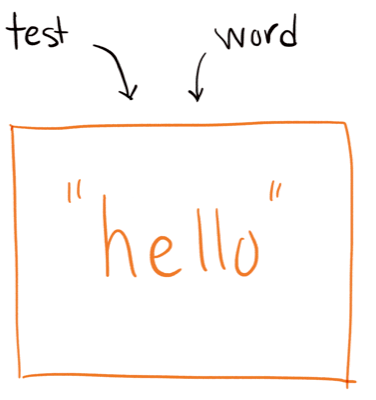
After the assignment (`word = "world"`), the `word` variable points at its new value “world”. But we *haven’t changed `test`*. The `test` variable still points at its old value.
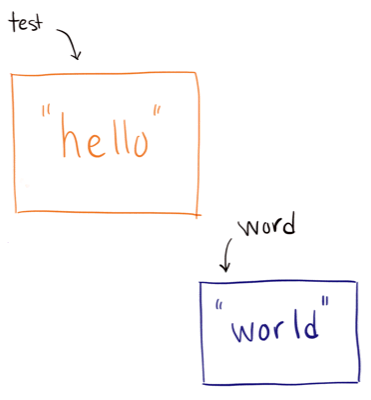
This is how assignment works in JavaScript. Reassigning a variable only changes that one variable. It doesn’t change any other variables that also pointed at that value. This is true whether the value is a string, boolean, number, object, array, function… every top-level variable works this way.
### Two Types of Types
JavaScript has two broad categories of types, and they have different rules around assignment and referential equality. Let’s talk about those.
### Primitive Types in JavaScript
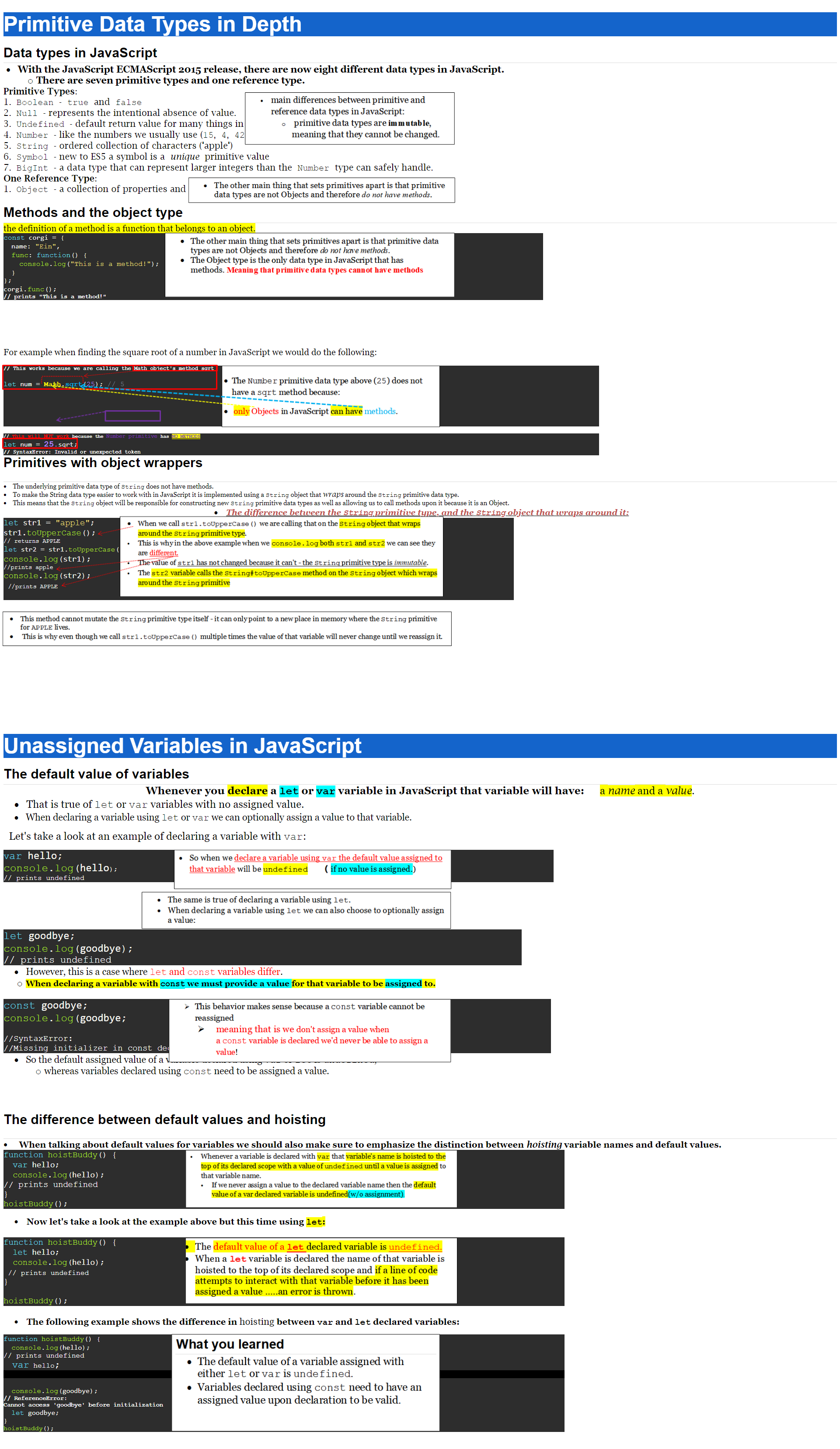
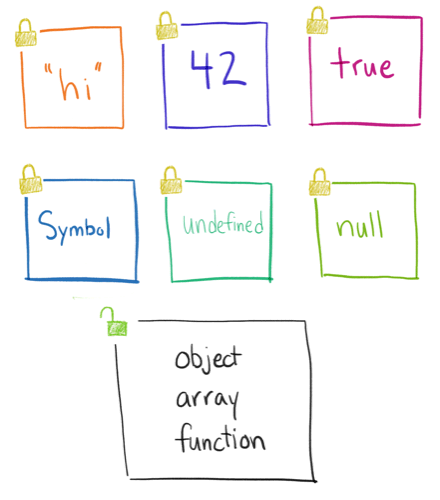
There are the **primitive types** like string, number, boolean (and also symbol, undefined, and null). These ones are *immutable*. a.k.a. *read-only*, *can’t be changed*.
When a variable holds one of these primitive types, you can’t modify the value itself. You can only *reassign* that variable to a new value.
The difference is subtle, but important!
Said another way, when the value inside a box is a string/number/boolean/symbol/undefined/null, you can’t change the value. You can only create new boxes.
It does **not** work like this…
This is why, for example, all of the methods on strings return a new string instead of modifying the string, and if you want that new value, you’ve gotta store it somewhere.
```
let name = "Dave"
name.toLowerCase();
console.log(name) // still capital-D "Dave"
name = name.toLowerCase()
console.log(name) // now it's "dave"
```
### Every other type: Objects, Arrays, etc.
The other category is the **object** type. This encompasses objects, arrays, functions, and other data stuctures like Map and Set. They are all objects.
The big difference from primitive types is that objects are *mutable*! You can change the value in the box.
### Immutable is Predictable
If you pass a primitive value into a function, the original variable you passed in is guaranteed to be left alone. The function can’t modify what’s inside it. You can rest assured that the variable will always be the same after calling a function – any function.
But with objects and arrays (and the other object types), you don’t have that assurance. If you pass an object into a function, that function could change your object. If you pass an array, the function could add new items to it, or empty it out entirely.
So this is one reason why a lot of people in the JS community try to [write code in an *immutable* way](https://daveceddia.com/react-redux-immutability-guide/): it’s easier to figure out what the code does when you’re sure your variables won’t change unexpectedly. If every function is written to be immutable by convention, you never need to wonder what will happen.
A function that doesn’t change its arguments, or anything outside of itself, is called a **pure function**. If it needs to change something in one of its arguments, it’ll do that by returning a new value instead. This is more flexible, because it means the calling code gets to decide what to do with that new value.
### Recap: Variables Point to Boxes, and Primitives are Immutable
We’ve talked about how assigning or reassigning a variable effectively “points it at a box” that contains a value. And how assigning a **literal value** (as opposed to a variable) creates a new box and points the variable at it.
```
let num = 42
let name = "Dave"
let yes = true
let no = false
let person = {
firstName: "Dave",
lastName: "Ceddia"
}
let numbers = [4, 8, 12, 37]
```
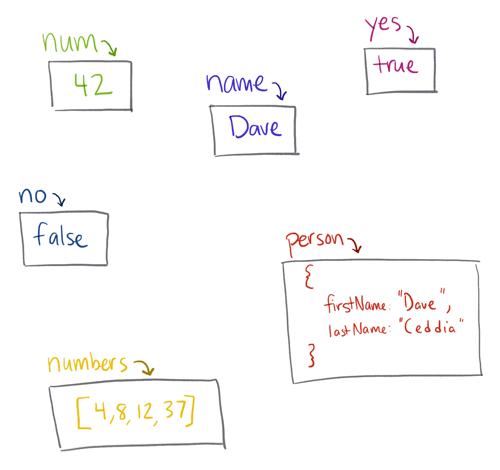
This is true for primitive and object types, and it’s true whether it’s the first assignment or a reassignment.
We’ve talked about how primitive types are immutable. You can’t change them, you can only reassign the variable to something else.
Now let’s look at what happens when you modify a property on an object.
### Modifying the Contents of the Box
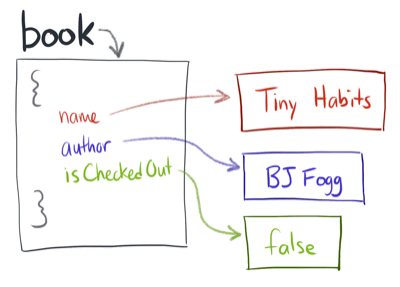
We’ll start with a `book` object representing a book in a library that can be checked out. It has a `title` and an `author` and an `isCheckedOut` flag.
```
let book = {
title: "Tiny Habits",
author: "BJ Fogg",
isCheckedOut: false
}
```
Here’s our object and its values as boxes:
And then let’s imagine we run this code:
```
book.isCheckedOut = true
```
Here’s what that does to the object:
Notice how the `book` variable never changes. It continues to point at the same box, holding the same object. It’s only one of that object’s *properties* that has changed.
Notice how this follows the same rules as earlier, too. The only difference is that the variables are now inside an object. Instead of a top-level `isCheckedOut` variable, we access it as `book.isCheckedOut`, but reassigning it works the exact same way.
The crucial thing to understand is that the *object hasn’t changed*. In fact, even if we made a “copy” of the book by saving it in another variable before modifying it, we *still* wouldn’t be making a new object.
```
let book = {
title: "Tiny Habits",
author: "BJ Fogg",
isCheckedOut: false
}
let backup = book
book.isCheckedOut = true
console.log(backup === book) // true!
```
The line `let backup = book` will point the `backup` variable at the existing book object. (it’s not actually a copy!)
Here’s how that would play out:
The `console.log` at the end further proves the point: `book` is still equal to `backup`, because they point at the same object, and because modifying a property on `book` didn’t change the *shell* of the object, it only changed the internals.
Variables always point to boxes, never to other variables. When we assign `backup = book`, JS immediately does the work to look up what `book` points to, and points `backup` to the same thing. It doesn’t point `backup` to `book`.
This is nice: it means that every variable is independent, and we don’t need to keep a sprawling map in our heads of which variables point to which other ones. That would be very hard to keep track of!
### Mutating an Object in a Function
Wayyy back up in the intro I alluded to changing a variable inside a function, and how that sometimes “stays inside the function” and other times it leaks out into the calling code and beyond.
We already talked about how reassigning a variable inside a function will not leak out, as long as it’s a top-level variable like `book` or `house` and not a sub-property like `book.isCheckedOut` or `house.address.city`.
```
function doesNotLeak(word) {
// this assignment does not leak out
word = "world"
}
let test = "hello"
reassignFail(test)
console.log(test) // prints "hello"
```

And anyway, this example used a string, so we couldn’t modify it even if we tried. (because strings are immutable, remember)
But what if we had a function that received an object as an argument? And then changed a property on it?
```
function checkoutBook(book) {
// this change will leak out!
book.isCheckedOut = true
}
let book = {
title: "Tiny Habits",
author: "BJ Fogg",
isCheckedOut: false
}
checkoutBook(book);
```
Here’s what happens:
Look familiar? It’s the same animation from earlier, because the end result is exactly the same! It doesn’t matter whether `book.isCheckedOut = true` occurs inside a function or outside, because that assignment will modify the internals of the `book` object either way.
If you want to *prevent* that from happening, you need to make a copy, and then change the copy.
```
function pureCheckoutBook(book) {
let copy = { ...book }
// this change will only affect the copy
copy.isCheckedOut = true
// gotta return it, otherwise the change will be lost
return copy
}
let book = {
title: "Tiny Habits",
author: "BJ Fogg",
isCheckedOut: false
}
// This function returns a new book,
// instead of modifying the existing one,
// so replace `book` with the new checked-out one
book = pureCheckoutBook(book);
```
####